Google Business Profile Not Showing Up? Start With the Field You Set Once
When a business doesn’t come up for the searches it should, the advice arrives in a predictable order. Get more reviews. Post more often. Add photos. Build citations. Some of that is good advice. All of it is slow, and most of it is a guess about a system nobody outside Google can see.
There is one exception. There is exactly one field on a Google Business Profile where Google has written down, publicly, that what you put in it affects what you get out of it.
It’s the business category. And it is the field almost nobody opens twice, because you filled it in during signup, in about four seconds, years ago.
I’m going to show you what Google actually says about it, what it carefully does not say, and then I’m going to open my own profile — which is wrong, and has been wrong since 2023.
What Google actually says
Two sentences, from Google’s own help documentation, both worth reading slowly.
The first is on the page about choosing a business category:
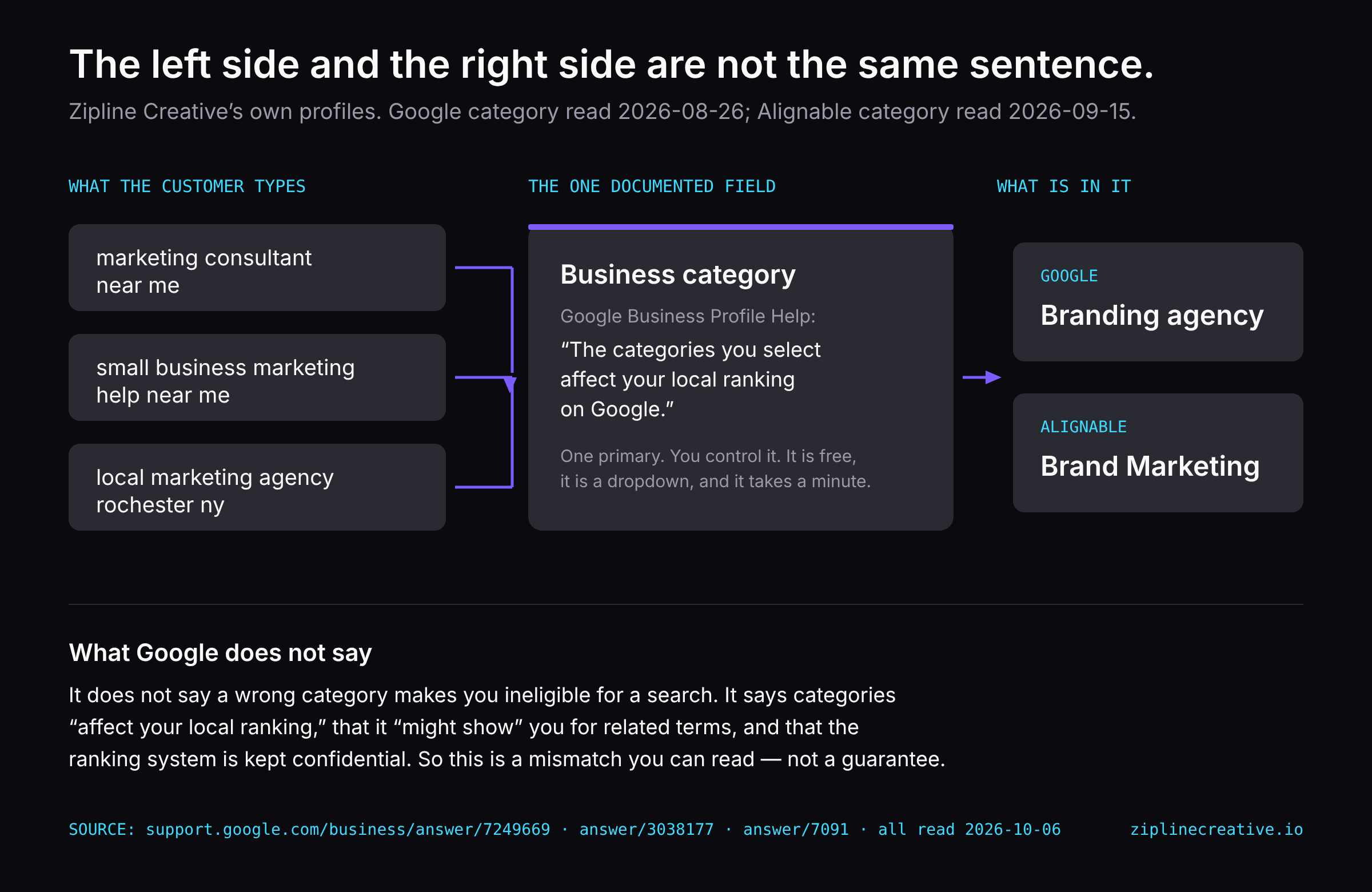
“The categories you select affect your local ranking on Google.”
The second, on the same page, describes what happens downstream of your primary category: Google says it might show your business in someone’s local search result when they search for related terms. The example it gives is a pizza restaurant, which can surface under “Restaurants,” “Italian Restaurants,” and “Pizza.”
That’s the mechanism, in Google’s words. The category is not a label on a shelf. It is what the system reads to decide which questions your profile is an answer to.
Google’s category guidelines add two instructions that cut against what most people do with the field:
“Use as few categories as possible to describe your overall core business from the provided list.”
“Do not use categories solely as keywords or to describe attributes of your business.”
Fewer, not more — this is not a field you stuff. And the category describes what your business is, not what it has and not what you’d like to rank for. The guidelines also note that choosing a specific category implicitly brings the broader ones with it: pick “Golf Resort” and Google says it implicitly includes “Resort Hotel,” “Hotel,” and “Golf Course.” Specific pulls general along behind it. General does not pull specific.
What Google does not say — and why that matters here
This is the part most articles on this topic skip, so let me put it before the fun part rather than after.
Google does not say that a wrong category makes you ineligible for a search. I looked, on all three of its relevant help pages, on 6 October 2026. The claim isn’t there. What’s there is weaker and more careful: categories affect local ranking, and Google might show you for related terms.
On the page explaining how local results are ranked, Google names three factors — relevance, distance and prominence — and says that “businesses with complete and accurate info are more likely to show up in local search results.” It also says, flatly, that “there is no way to request or pay for a better local ranking on Google,” and that the details of the ranking system are kept confidential on purpose.
So nobody can honestly tell you what changing your category will do to your ranking. I can’t, and the people who say they can are ahead of their evidence.
What I can tell you is that this is a field you control, it’s free, it takes a minute, it’s the only field where the platform has told you in writing that it reads it — and it is very commonly wrong. Including mine.
Mine says “Branding agency”
Here is my own Google Business Profile. Primary category: Branding agency. It has said that since the profile was created, and as of the audit I ran on 26 August 2026 it still did.
In fairness to whoever typed that — me — it isn’t a lie. I’ve done branding work and been paid for branding work. As a description of a service I offer, it’s accurate.
Now put it next to the search I actually want to win:
marketing consultant near mesmall business marketing help near melocal marketing agency rochester ny
Those are not the same sentence. I filled in a field describing one service, and then spent three years wondering why I wasn’t turning up as an answer to a question about a different one.
And the part that stings: the categories I want are in the dropdown. They have been the entire time. There was no gate, no approval, no fee. It’s a dropdown in a free dashboard I control, and I hadn’t opened it since the day I made the profile.
The same mistake, twice
It gets worse, and the worse version is the useful one.
Alignable is a local business network — around 7,700 business owners in my own city are on it. My category there reads Brand Marketing. The same mistake, made independently, on the second platform where local owners go looking for local help.
Then there’s the field underneath it. My “ideal customer” on that profile is set to real estate agents and contractors, located “all over the country.”
I sell a fixed-price service to small businesses, in person, in one city. I had told a local network in writing that I wanted national clients in two trades I don’t specialise in — and then, predictably, that network kept offering to introduce me to real estate professionals.
The platform isn’t broken. It was doing exactly what I told it to do. I filled in the form wrong and then judged the platform for reading it.
That’s the pattern worth taking away. Not “Google is hard.” The intake form is the positioning decision, and most of us made it in a hurry, once, and never went back to check what we’d said.
What to do this afternoon
Four steps, in this order. Twenty minutes, no money.
1. Open your profile and read your primary category out loud. Not from memory — open it. Most people are wrong about what theirs says, which is the whole problem.
2. Write down the search you actually want to win, with “near me” on the end if that’s how your customers search. Put the two sentences side by side. If they don’t match, you’ve found something real.
3. Screenshot the current state before you change anything. You cannot show yourself a before-and-after you didn’t photograph, and you will want to know what you changed when you’re trying to work out what moved.
4. Then open the dropdown and read what’s actually available. Fewer, not more. The thing you are, not the things you have. If you genuinely run separate departments, that’s what additional categories are for; if you don’t, one is the honest answer.
A note on a number you’ll see repeated: a great deal of writing on this topic states that you get one primary category and up to nine additional ones. I couldn’t find that limit stated anywhere in Google’s own documentation — what Google says is “as few as possible.” I’m leaving the number out rather than repeating it, and you should treat any article that asserts it without a source the same way.
The rest of the profile
Category is one field. There are fourteen more that decide whether a nearby customer picks you, and most of them are as quick to check.
I put all fifteen into a check you can run yourself in an afternoon: The Google Profile Check — five pages, fifteen scored items, out of thirty, with a section for category selection and a page that tells you what your score means. It’s free, and there’s no email-gate game.
→ The Google Profile Check — 15 questions, free
If you run it and come out the other side wanting the fix rather than the list, the GBP Optimization Kit ($39) is the same ground as a working session: a 30-day activation calendar, a category and keyword worksheet, and the review-request scripts.
And if you’d rather someone just went and corrected your listings across Google, Apple Maps, Bing, Yelp and the directories — claimed, verified, documented, with a 30-day re-check — that’s the Presence Fix, $349, one session.
I haven’t changed my own category yet. When I do, I’ll publish the before and the after with dates on both — including if nothing happens. That seems like the minimum standard for writing about this at all.
Sources
- Google Business Profile Help — Choose a business category (read 2026-10-06)
- Google Business Profile Help — Guidelines for representing your business: categories (read 2026-10-06)
- Google Business Profile Help — How to improve your local ranking on Google (read 2026-10-06)
Want this done for your business?
There is one field on your Google Business Profile where Google has published, in its own words, that what you type in affects what you get out. Most owners set it once at signup and never reopen it. Mine was wrong for three years.